

最近在找工作,看到二进制安全岗位都在要求会fuzzing,所以就去看了看fuzzing相关的技术文档。刚开始学,可能错误很多,欢迎批评指正
一、什么是fuzzing
In programming and software development, fuzzing or fuzz testing is an automated software testing technique that involves providing invalid, unexpected, or random data as inputs to a computer program.
以上是wiki给出的定义:在编程和软件开发中,模糊测试是一种自动化软件测试技术,它涉及向计算机程序提供无效、意外或随机的数据作为输入。这是一种基于黑盒(或灰盒)的测试技术。但是AFLplusplus是利用的编译时插桩,所以肯定是需要源码的,所以属于白盒测试。
根据AFLplusplus里面给出的定义来看:
模糊测试是对代码库或可执行文件进行自动化输入测试。模糊测试会向可执行文件提供无效或意外(有时是随机)的数据,以期发现一些未定义行为或漏洞。
二、为什么学fuzzing?
- 没有 Fuzzing:人工审计代码可能需要几天才能找到一个潜在的、不一定能触发的隐患(这才是真正的“思路”)。
- **有 Fuzzing:它能在几小时内塞入上亿个测试用例,直接拍在你桌上一个文件,告诉你:“按这个输入,程序必崩。”
三、怎么fuzzing?
Knowing how to build different projects is essential to fuzz a target
知道如何构建不同项目对于模糊目标至关重要
3.1 Terms Used Throughout the Module
- Container: An isolated environment on a computer that allows code to run freely without interacting with the rest of your computer or other hardware. You can think of this like a Virtual Machine which only uses a command line interface.
**容器** :计算机上的一个隔离环境,允许代码自由运行,无需与计算机其他部分或其他硬件交互。你可以把它想象成只使用命令行界面的虚拟机。
- Wrapper: A program that allows a fuzzer to interact with the slice being fuzzed. It is the code which glues together the fuzzer and the target code.
**封装器** :允许模糊器与被模糊切片交互的程序。它是将模糊器和目标代码粘合在一起的代码。
- Mutations: New inputs which the fuzzer generates by modifying previous inputs with the goal of reaching more areas of the target code.
**突变** :模糊器通过修改之前的输入生成的新输入,目标是覆盖更多目标代码区域。
- Slice: A section of a codebase that is isolated from the rest of it. Isolation of slices makes finding vulnerabilities and bugs easier and more efficient.
**切片** :代码库中与其余部分隔离的部分。切片的隔离使发现漏洞和漏洞更高效。
上述是在github,原封不动copy过来的,还是后文慢慢解释吧。
3.2 Setup and Software
安装一个ubuntu24.04,然后参考docker官网的教程把docker装上。当然你可以去找一个博客把这两个装上。
这里不写怎么装了,因为太多大佬的博客已经教了,其实是懒
3.3 The First Fuzz
3.3.1 How to create an AFL++ Docker Container
首先是创建一个编译好的AFLplusplus的docker容器,当然你也可以自己去编译一个
sudo docker run -it -d --name afl-demo aflplusplus/aflplusplus
sudo docker exec -it afl-demo /bin/bash
此时你便进入了ALFplusplus的目录:
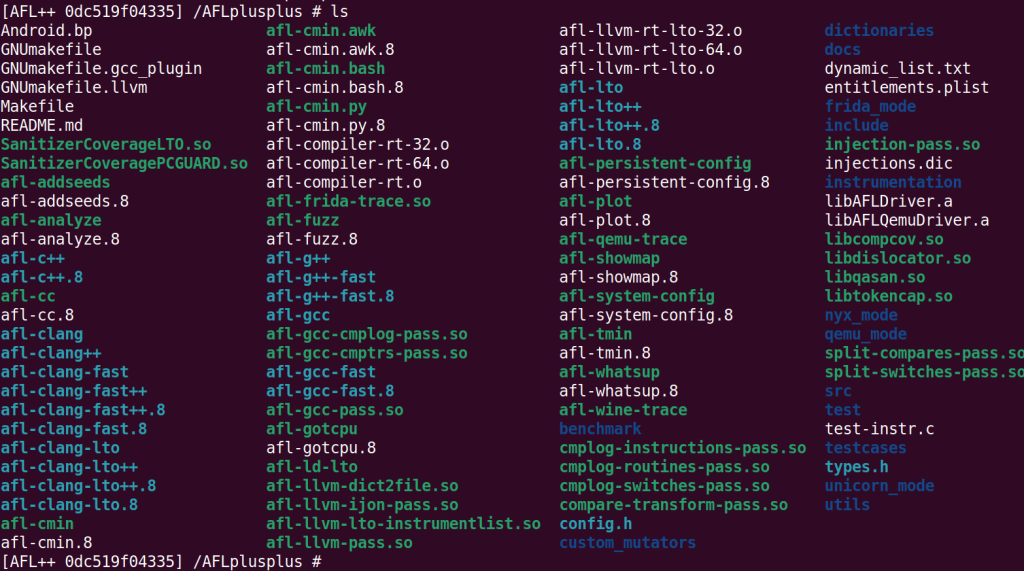
这说明你的容器启动没有问题,其实我也还不清楚这里面所有的模块
mkdir -p ~/fuzz_demo1 && cd ~/fuzz_demo1
先创建我们的fuzz_demo1文件夹。作为我们的学习AFLplusplus的第一个项目。
3.3.2 How to Run AFL++ on Exercise 1
接下来我们做第一个练习。
mkdir -p ~/fuzz_demo1/exercise1 && cd ~/fuzz_demo1/exercise1
然后编辑两个文件:
# CMakeLists.txt
cat > CMakeLists.txt << EOF
project(simple_crash)
add_executable(simple_crash simple_crash.cpp)
EOF


# simple_crash.cpp
cat > simple_crash.cpp << EOF
#include <iostream>
#include <stdio.h>
#include <stdlib.h>
#include <string.h>

using namespace std;

int main() {

   string str;

   cout << "enter input string: ";
   getline(cin, str);
   cout << str << endl << str [0] << endl;

    if(str[0] == 0 || str[str.length() - 1] == 0) {
        abort();
    }
    else {
        int count = 0;
        char prev_num = 'x';
        while (count != str.length() - 1) {
            char c = str[count];
            if(c >= 48 && c <= 57) {
                if(c == prev_num + 1) {
                    abort();
                }
                prev_num = c;
            }
            count++;
        }
    }

    return 0;
}
EOF
此时你的目录应该有两个文件:

下面我们创建build文件夹,并把编译结果放入build文件夹。
mkdir build
cd build

# 设置临时环境变量,要求编译C时使用afl-clang-fast,编译C++时使用afl-clang-fast++
CC=/AFLplusplus/afl-clang-fast CXX=/AFLplusplus/afl-clang-fast++ cmake ..

make
然后为AFLplusplus设置种子:
cd ..
mkdir seeds
cd seeds
for i in {0..4}; do dd if=/dev/urandom of=seed_$i bs=64 count=10; done
cd ..
cd build
此时便可以开始fuzzing了
/AFLplusplus/afl-fuzz -i ~/fuzz_demo1/exercise1/seeds/ -o out -m none -d -- ~/fuzz_demo1/exercise1/build/simple_crash
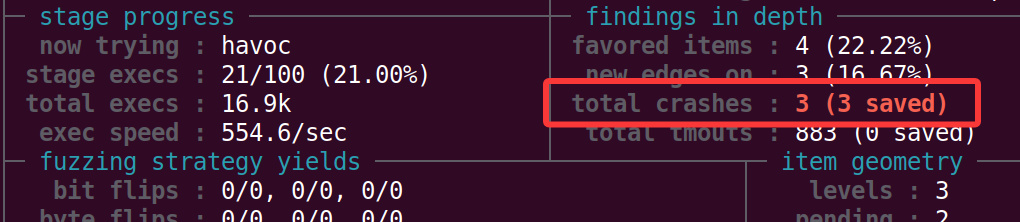
当至少一次崩溃时,按Ctrl + C退出AFL++,然后我们去查看导致程序崩溃的输入:
cd out/default/crashes/
ls
你会看到三条,让程序崩溃的输入,此时可以gdb调试一下。这里我们取第一个用例
id:000000,sig:06,src:000001,time:128,execs:59,op:havoc,rep:2
开始调试分析
gdb ./simple_crash

run < ./out/default/crashes/id:000000,sig:06,src:000001,time:128,execs:59,op:havoc,rep:2
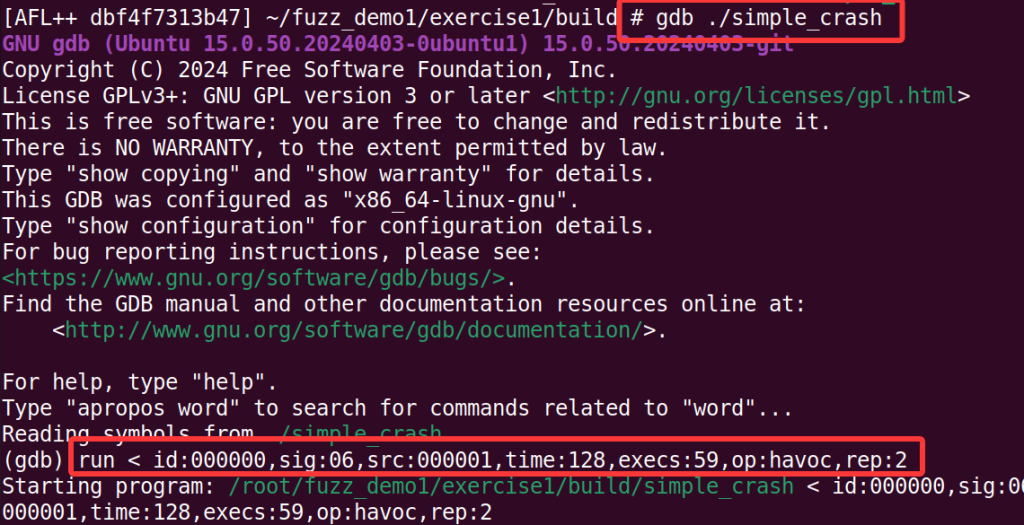
然后使用backtrace,查看调用栈,不难看出,程序是在simple_crash.cpp的第16行崩溃了
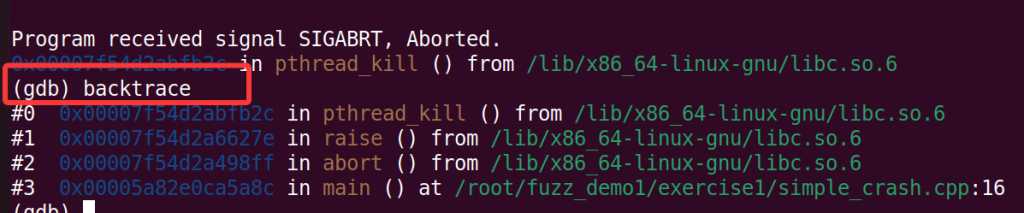
然后我们切换到发生崩溃的栈帧
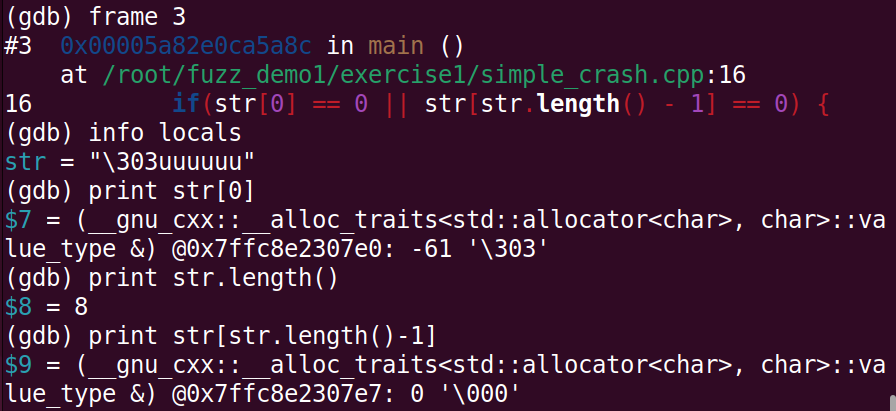
不难看出,确实是满足str[str.length() - 1] == 0条件,然后执行了abort()函数,程序崩溃。也确实说明,模糊测试的目的:探索所有可能的执行路径,包括错误处理分支。
虽然这里导致程序崩溃,但对开发者来说是一个有价值的信息:程序在处理空字符输入时行为是否符合预期?
好了,对于AFLplusplus的最简单的例子就讲这些了
评论(0)
暂无评论